
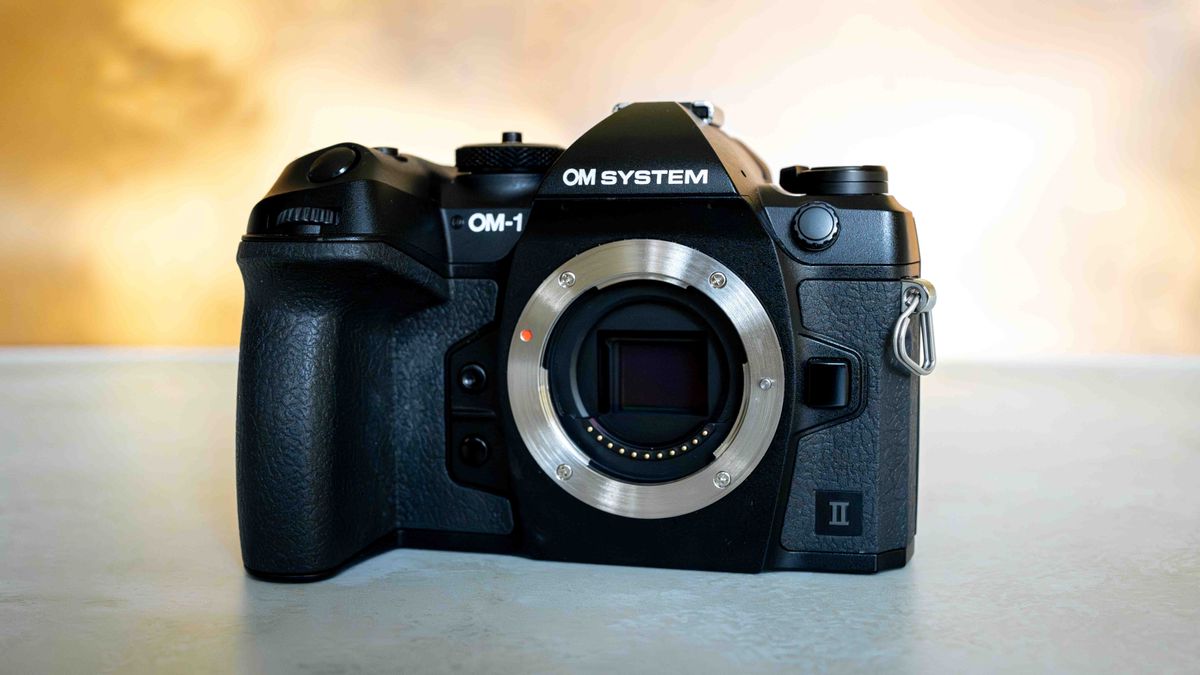
Specifications
Sensor: 20.4MP 4/3-inch Stacked BSI Live MOS sensor
EVF resolution: 5,760K dots
Monitor: 3-inch vari-angle LCD touchscreen, 1,620K dots
Image stabilization: Up to 8.5 stops
Autofocus detection range: -8 – 19 EV
ISO Range: ISO 80 – 102,400 (upper default ISO 256,00)
Minimum shutter speed: 60 seconds
Burst rate: Up to 120FPS
RAW buffer: 213 frames / 120FPS
Video: 4K 60FPS, Unlimited recording time
Battery life: 520 shots
Storage: 2 card slots — SD Memory Card (SDHC, SDXC, UHS-I, UHS-II compatible)
Dimensions: 5.46 x 3.61 x 2.86-inches / 138.8 x 91.6 x 72.7mm
Weight: 599g (including battery and memory card)
OM System (formerly Olympus) have made a big statement with their OM-1 line of cameras. With a lot of its specs rivaling the big hitters like the Canon EOS R5, Nikon Z8 and Sony Alpha range, the OM-1 Mark II is a flagship camera that says: “You should pay attention to me.”
Micro Four Thirds (MFT) cameras have always been underestimated in the photography world due to their small sensors and compact form. They’re often seen as more of a “beginner” camera — our reviewer, Kimberley, had an Olympus Pen E-PL-8 which she loved — and MFT cameras aren’t always taken seriously by serious hobbyists or professional photographers, until now.
We know a lot of very talented and experienced photographers who are fully converted to MFT cameras, and after spending some time with the OM-1 Mark II, we can see why.
In this review, we’ll be putting the OM-1 Mark II to the test to see how it performs for a range of photographic pursuits. We’re particularly intrigued by its Starry Sky Autofocus and Live Composite modes — if they work as well as they claim, the OM-1 Mark II could end up being one of the best astrophotography cameras. It’s also capable of up to 120FPS, which is, frankly, insane, considering many of the best cameras for wildlife photography can ‘only’ typically shoot between 20-40FPS.
OM System OM-1 Mark II review
Design & comfort
Image 1 of 3


The layout, weight and dimensions of the OM-1 Mark II are identical to its predecessor. The only design difference is that the dials are now rubberized (which is great for cold night shoots when you’re wearing gloves), and you can now map the menu button to one of the buttons on the right-hand side of the body, keeping your left hand free to support the lens.
We found it comfortable to hold for long periods and it has a good grip for any size hand. The only time it got too heavy and gave our reviewer a hand-cramp was when she paired it with the M.Zuiko ED 40-150mm f/2.8 Pro (1.67 lbs/880g) to shoot a football (soccer) match and left the mounting plate for her monopod at home (entirely her own fault, and also down to the weight of the lens, not the camera). All the other handheld shoots, however, we had no comfort issues with.
It’s also IP53 weather-sealed, which they claim is “built to excel through snow dust and rain.” We didn’t really want to tempt fate by testing out whether this was true, though.
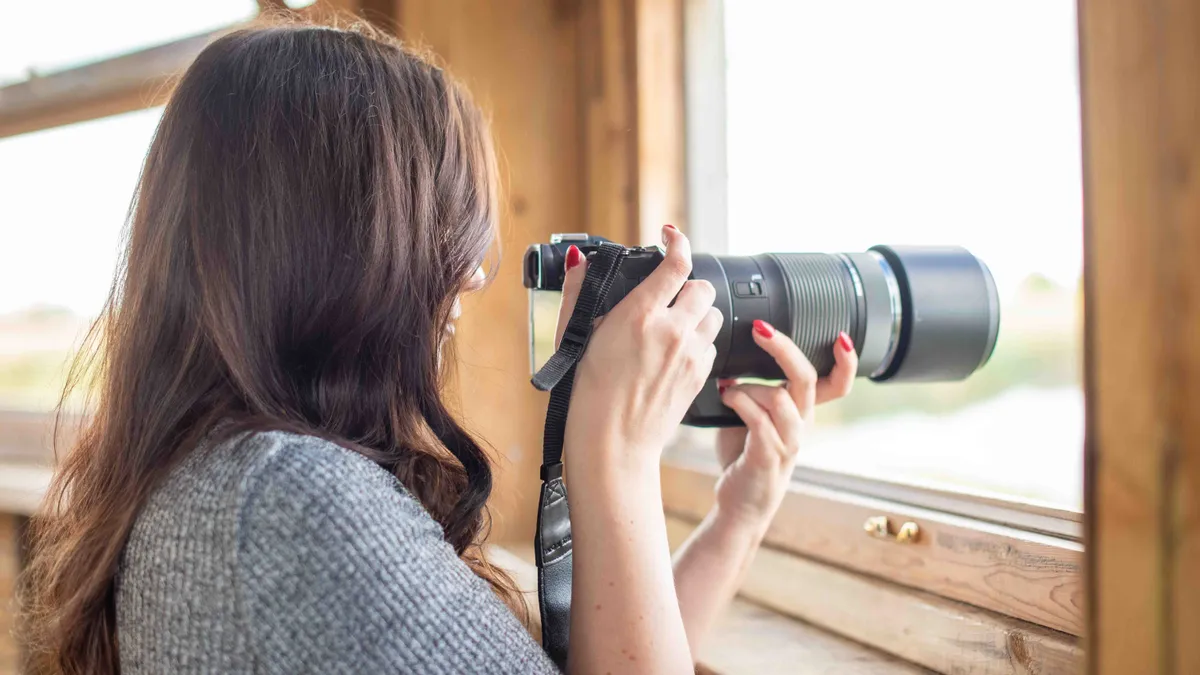
We really like that some of the modes and controls already have their own designated buttons on the body (specifically the drive and focus modes), although we wish some of the buttons were more pronounced. There are some we can make do with, but some of the buttons are more flush with the body, making them hard to press even with bare, gloveless fingers. We also would’ve liked a third dial on the body for ISO so we could adjust all three exposure settings independently. There is an ISO button just next to the top dial which enables you to scroll through the ISO values with either the front or top dial, so it’s a decent enough halfway house between there being a third dial and having to dive into the menu to change the ISO. Still, we’re not sure why they didn’t just add another dial onto the back of the body in place of the up, down, left and right buttons.

Another design feature we’re not convinced by is the location of the on/off switch on the left side of the body (a similar placement to the Canon EOS R5). It just felt like a very inconvenient place to have it when you consider how you actually hold a camera, and because it’s not very easily accessible, it slows you down if you need to act quickly to turn the camera on to get those ‘blink and you’ll miss it’ shots at a moment’s notice.
We much prefer the on/off toggle being on the right side of the body, like on the Sony and Nikon models, so you can flick the switch easily with your forefinger while you’ve got the camera up to your face. When it’s on the left side of the body, your left hand has to move from supporting the lens to flipping the power switch, then back onto the lens again before lifting the camera up. It’s only a small thing, and could just be a personal preference, but we found it inconvenient enough to warrant writing an entire paragraph about it in this review.
Otherwise, we liked that it has two card slots and thought they were well placed and easily accessible should you need to change cards mid-shoot — it’s always annoying when the SD card slot is in with the battery, especially when you’re shooting on a tripod. However, although the ports are easily accessible, we thought the rubber flaps were a little flimsy and could easily be accidentally broken or pulled off.
In regards to the menu system, it’s probably one of our favorites of all the cameras we’ve tested. It’s easy to navigate and well laid out, and we especially liked that there was a short explanation of what each setting and feature does, which is really handy for beginners or anyone who isn’t technically minded or familiar with what certain things do.
Electronic viewfinder & LCD screen

- Highest resolution LCD screen from OM System so far
- EVF is good, but not the best we’ve seen
- Tiny bit of rolling shutter in the EVF
The OM-1 Mark II has a 3-inch fully articulating touchscreen with a 1,620,00 dot resolution. Although it’s not the most detailed screen there is, it has the highest resolution of any OM System/Olympus model to date, and we thought it was bright, true to life with good color, and the touch display was responsive. Even in the dark, we were easily able to see our image even in areas with substantial light pollution.
The electronic viewfinder sits somewhere in the middle compared to a lot of other popular models, with a 5,760,000 dot resolution. We found it easy to track subjects through the viewfinder in various lighting conditions, although we saw a tiny bit of rolling shutter when following a moving subject through the viewfinder (but not enough to be distracting).
Image quality & dynamic range
Image 1 of 4


- Pleasing image quality for 20.4MP
- Sometimes struggled bringing detail back in the highlights
- Images were bright with good color
A large part of image quality is down to the lens, but throughout our time with the OM-1 Mark II, we’ve been continuously impressed with the quality of the images we’ve taken with several different lenses. It wouldn’t be fair to compare the OM-1 Mark II to some of the high-end professional full-frame cameras we’ve reviewed, but for an MFT sensor, we think it certainly holds its own.
The sensor is “only” 20.4MP, which may be less than desirable for many shooters, however, the sensor is stacked which gives its overall performance an extra boost. And unless you’re printing significantly large billboard-sized prints, it’s unlikely the lower megapixel count will actually make much of a difference.
Image 1 of 2


Dynamic range was good, although, we noticed during a sunset shoot that if the sky was at all overexposed (which is easy to do when pointing directly at the sun) we struggled to get the details back in the highlights in post-processing. We used the multiple exposure (bracketing) feature to help eliminate this, but it’s something to keep in mind if you often need to rely on bringing details back in the highlights in Lightroom afterwards.
Autofocus & subject detection
Image 1 of 4


- Bird Mode works for insects, but would like to see a dedicated Insect Mode
- Easily handled tracking multiple moving faces in the frame simultaneously
- Accurate and reliable autofocus even in low light
The OM System OM-1 Mark II has six different subject detection modes — humans (faces and eyes), cars and motorcycles, airplanes and helicopters, trains and locomotives, birds, and animals. We wanted to capture as many different subjects as possible to see how well the camera could detect and lock the focus on each given subject.
First, we tested the human subject detection, and we have no complaints here. It was easily able to detect and track our subject’s face and eyes, with the camera effortlessly switching to face detection when she was wearing sunglasses. There were a few shots that missed slightly the more she moved around, but overall we’d happily use the OM-1 Mark II for portraits.

To take it a step further, we wanted to see how it would handle multiple faces at once, so we took the camera to photograph a soccer match. We were really impressed with how it tracked multiple faces and moving elements simultaneously, although it sometimes focused on the wrong face or the back of a player’s head when they ran between the player with the ball and the camera.
Image 1 of 7


When it comes to wildlife photography, the OM-1 Mark II has bird mode and animal mode. We took it to a nature reserve with the M.Zuiko Digital ED 100-400mm F5.0-6.3 IS lens and overall, it coped very well. We found some dragonflies sunbathing on a fence and it was able to pick up details in their eyes and wings very well, although it struggled to figure out which part of their anatomy were the eyes.
Considering there are dedicated modes for airplanes and trains, we’d have liked a separate mode for insects, but we photographed different insects using bird mode and it coped fairly well, although sometimes the camera struggled to track such small creatures in flight. When we used animal eye detection on a pair of cats, it performed much better, accurately detecting and tracking their eyes even in low light.
We tried to photograph a passing commercial airplane using airplane mode, but the camera just wouldn’t focus on it. But we switched to bird mode and it detected the plane almost instantly. Is it a bird? Is it a plane? It’s a bird, according to the OM-1 Mark II.
Live Composite & low light performance
Image 1 of 2


- Live Composite eliminates guesswork when shooting star trails
- Images taken in low light were quite noisy
- Indoor images at ISO 3,200 were noisier than outdoor images taken at ISO 3,200
Live Composite makes the OM-1 Mark II one of the best cameras for capturing star trails or light painting at night, as it enables you to see what the photo looks like in real-time as the image is being recorded, which is immeasurably helpful for shooting star trails. Once Live Composite is set, you can see the progress of the image on the LCD screen so you know to stop the shutter when you’ve reached your desired effect. It then saves one single image as an ORF (RAW) file. While this is a very handy feature, particularly for users who only do the occasional bit of astro, more seasoned shooters who want more control over their final image might want the option to save all the images rather than compositing them into one file in-camera.
The area that let the OM-1 Mark II down for us was general low-light shooting that didn’t allow for a slow shutter speed. Though we will preface this by saying that the lens we used for these next photos had an f/5 aperture, so you would likely yield better results with a wider aperture lens attached. To test its noise handling, we took some photos of cats on an overcast day outside and inside a dark house during the day.
Image 1 of 2


We noticed that ISO 3,200 looked better and less noisy than the same ISO 3,200 did when taken inside, but unless you can afford to slow the shutter speed down for slow-moving or stationary subjects at dawn or dusk (for wildlife photography), or you have a very wide lens, you may have difficulty with higher ISO values on the OM-1 Mark II. We also found this to be the case when we photographed the evening football match. Even with the floodlights on, the images became quite noisy when we had to start increasing the ISO.
Starry Sky AF
Image 1 of 2


- Works well even in urban areas with light pollution
- Needs to be activated, which requires a small amount of research as it’s not immediately obvious
- Stars were pin-sharp — a great feature for beginners or anyone who struggles with manual focus
Another fantastic feature for astrophotography is OM System’s Starry Sky AF. We’ve all spent hours out in the cold at night trying to get some great astro shots, only to get home and discover that we missed the focus and all our shots are blurry.
We’ll admit, we were very skeptical of Starry Sky AF before we tested it out. The first thing photographers are taught when taking photos of stars is the importance of nailing manual focus because cameras can’t detect the faint pinpoints of light way off in the distance. So an algorithm that can enable a camera to automatically detect and focus on those faint stars almost has to be seen to be believed.
For context, we took the above photo in a suburban back garden in a town that is Class 5 on the Bortle Scale, and there also happens to be a bright streetlight right next to the house for good measure. Even in those conditions, the OM-1 Mark II had no trouble at all focusing on the stars. We also took it to shoot the milky way over Glastonbury Tor, which is the same Bortle Class 5 but there was less immediate light pollution directly around us

To activate it, go into the Starry Sky AF setting in the menu to choose your settings. You need to select the AF Priority (either speed or accuracy), the AF Operation (select which button activates it) and the Release Priority (determines whether the shutter can be released with or without accurate focus). Then, when you’re ready to shoot, you just go to your focus modes and select the Starry Sky AF mode, then press whichever button you mapped it to (we chose AF-ON). It’ll run the Starry Sky AF for a few seconds, then once it’s done, you’re ready to take the photo. And that’s all there is to it.
It’s worth saying here that even though the high ISO performance wasn’t much to shout about during the day, we have been continuously impressed by its astro performance thanks to its noise reduction feature when Night Vision mode is activated.
Live GND

- A really handy feature if you own a lot of lenses with varying filter thread sizes
- Can be adjusted using the touchscreen
- Three different strengths (GND 2, 4 and 8) each with three intensities (soft, medium or hard)
A neat feature for landscape photographers is the built-in Live GND (Graduated Neutral Density). This allows you to view and adjust a graduated neutral density filter effect on the touchscreen, eliminating the need to carry filters around with you (which is also a bonus if you have a lot of lenses with different filter thread sizes).
There are three different strengths to choose from — GND 2, 4 and 8, and a choice between a soft, medium or hard effect for each. We found it to be nicely responsive on the touchscreen and we liked that it works in both landscape and portrait orientation, and you can use the dials as well as the touchscreen to change the angle of the filter.
Burst rate, buffer & battery life

- Can continue shooting while the buffer is clearing
- Great battery life for stills and video
- Insanely fast 120FPS burst rate
The battery life of the OM-1 Mark II is, in our opinion, catastrophically underestimated in OM System’s specs sheet. They claim you can shoot up to 500 photos from a single charge, but when we set on continuous interval shooting and maxed out our 128GB SD card with 3699 shots, it only took the battery from 96% down to 61%. The caveat here is that we weren’t ‘using’ the camera as such (changing settings, following a subject around while the camera was on, etc), and there was only 1 second in between shots. Regardless, we think that’s quite an impressive battery life and we didn’t notice a substantial difference in the battery performance while we were shooting a 90-minute football match.
They also boast an unlimited recording time for video. To test this, we started recording in 4K 30p at 99% battery where it stated 88 mins capacity. It started blinking red indicating the battery was about to run out at 2 hrs 27 mins (where it stated that it had 14 mins left on the card), and the battery died 5 minutes later at 2 hrs 32 mins. The camera got warm after a short while (for both stills and video) but didn’t overheat to the point of failure.

We were also very impressed with the buffer. The ability to continue shooting while the camera is clearing the buffer (provided you aren’t maxing it out) proves endlessly useful when you’re shooting fast action or portraits without having to wait for the buffer to clear — something that drives us up the wall about Sony cameras. Plus, they’ve more than doubled the buffer capacity from 92 shots in the OM-1 to 213 shots (at 120fps) in RAW on the OM-1 Mark II.
It is worth noting that while the ability to shoot blackout-free 120FPS is impressive on paper, and there may be incredibly niche circumstances where you might want to use it, in the majority of cases, 10 or 20FPS will do just fine, and you won’t need to sort through thousands of identical frames in post. We’ll admit we were a tiny bit disappointed that you can’t hear the 120FPS shooting as it essentially just records footage like a video, but we may have been a bit optimistic there.
What’s new?
While there are some new and updated features in the OM-1 Mark II compared to its predecessor (the original OM-1), there’s nowhere near as big of a jump as there was between the OM-1 and the model before that — the OM-D Mark III (think of the OM-1 as the OM-D Mark IV, if you like). We were blown away by the OM System OM-1 when we reviewed it and gave it a massive 5/5 stars, but users who already own the OM-1 may find that there aren’t enough new or worthwhile features to warrant upgrading to the OM-1 Mark II. However, some key differences between the OM-1 and the OM-1 Mark II may be the deciding factor to sway users who don’t own either one.
Here are some of the main differences between the two:

- Improved image stabilization: Both models feature 5-axis image stabilization, but the OM-1 Mark II has 8.5 stops, whereas the OM-1 has 7.
- Live GND (Graduated Neutral Density): Here we see the introduction of Live GND, with three steps (GND 2, 4 and 8) and three types within each step (soft, medium or hard).
- Autofocus: The OM-1 Mark II has gained a dedicated human detection mode, replacing the standard face/eye detection.
- Body details: The weight and size remain unchanged, however, the front and rear dials are now rubberized to aid grip. You can also assign the menu to a right-hand button on the body, leaving your left hand to support the lens.
- Larger buffer: The OM-1 Mark II can capture 213 RAW frames at maximum burst — a big increase from the OM-1’s 120 RAW frames.
- Webcam and vertical video support: Useful for social media content creators.
Verdict

What we liked:
- Live GND is great for landscape photographers with many lenses of varying filter thread sizes
- Autofocus was accurate and reliable, even in low light, with a good range of subject detection modes
- Comfortable to hold for long periods
- The menu system is easy to navigate and understand
- Two card slots are great for creating backups or just having more storage
- Has lots of features for various photographic pursuits
- Live Composite mode makes star trails a breeze
- Starry Sky AF is accurate even in areas with light pollution
- Very good stills battery life
- Unlimited video recording equates to just over 2 hrs 30 mins without being plugged in.
- Can shoot when the buffer is clearing
- 20FPS silent sequential shooting is great for wildlife photographers
- Blisteringly fast 120FPS burst rate
What we didn’t like:
- There aren’t enough worthwhile upgrades from the previous model
- Disappointing amount of noise in low-light images
- The buttons are hard to locate and press in the dark, particularly while the camera is pointing upwards
- We passionately disliked the location of the on/off switch
- Would’ve liked a third dial on the body
- 20.4MP could be improved
- Tiny bit of rolling shutter when using the EVF
- Port doors are a little flimsy
Image 1 of 3


Buy it if:
✅ You’re a serious hobbyist: Pros would likely want something with a larger sensor and higher resolution, but for serious hobbyists who want an incredibly capable camera, the OM-1 Mark II is a fantastic choice.
✅ You’re a keen wildlife photographer: Thanks to its AI-powered autofocus subject detection and insanely fast burst rate, it’s a great option for wildlife photography.
Don’t buy it if:
❌ You already own the OM-1: For a lot of users, there won’t be enough upgrades from the previous model to warrant spending the extra money on the OM-1 Mark II.
❌ You’re a beginner: That’s not to say beginners wouldn’t get on with it, but it’s likely going to be overkill for what beginners would need, plus it’s one of OM System’s more expensive models.
Having been utterly spoilt by having the chance to review some of the best cameras on the market, we honestly weren’t expecting to be all that impressed with the OM System OM-1 Mark II. But after thoroughly testing out and using all the features it offers, it has exceeded our expectations and we think it thoroughly deserves its spot at the top of their range.
There seems to be something in this camera for everyone, which can’t be said for every model. Live Composite and Starry Sky AF make it fantastic for beginner astrophotography, Live GND and multiple exposure bracketing benefit landscape photographers and the blisteringly fast burst rates and subject detection autofocus make it a great option for both sport/fast action and wildlife photography.
The high ISO images were a little noisy for our liking compared to other models we’ve tested, so we wouldn’t recommend it if low-light portraits are your specialty where you need to maintain a somewhat speedy shutter speed.
It’s perfectly suited to serious and passionate hobbyists who want a powerful and capable machine without having to spend upwards of $3,000 on professional full-frame models. While a beginner would get on just fine with it in a practical sense (for example, each setting has a short explanation of what it does in the menu), it would likely be both too expensive and overkill for the needs of a beginner overall — unless you’re happy to jump in at the deep end and are confident you’re going to continue the hobby.
If the OM-1 Mark II isn’t for you
The OM-1 Mark II is undoubtedly an impressive camera that stands out in the MFT world, but it won’t be to everyone’s taste.
Loyal full-frame shooters probably wouldn’t even consider it, and it could be overkill for absolute beginners with the amount of features it has. We also wouldn’t recommend it to anyone who just wants a compact and lightweight camera for travel.
Here are some alternative products we’d recommend:
How we tested the OM-1 Mark II
Image 1 of 4


Throughout our time with the OM System OM-1 Mark II, we wanted to take advantage of as many of its features as we could. Over the course of a few months, our reviewer took it to flower fields, shot a football (soccer) game, photographed cats and bees, shot astro in the back garden and more. To test its battery life, we set it going on continuous interval shooting until it either ran out of battery or filled up the card, and we put ourselves in the shoes of various types of photographers to consider how it performs for various pursuits.
We used a variety of different lenses, including the M.Zuiko ED 17mm f/1.2 Pro, the M.Zuiko ED 40-150mm f/2.8 Pro with a 1.4x teleconverter and the M.Zuiko Digital ED 100-400mm F5.0-6.3 IS. Our reviewer either shot handheld or used one of her Benro tripods — the Rhino, Tortoise or the Mach3.
Our reviewer, Kimberley, said: “When I’m reviewing a camera I will compare them to other similar models I’ve tested and whether they perform better, worse or the same, but I also find it’s important to consider where each product sits in the market and who each model is aimed at. For example, it wouldn’t be fair to compare the OM-1 Mark II with the Sony A1. So even though one camera will be leaps and bounds better, I always try to form my opinion on each camera for what it is in its own right. I’ll also never give a 5-star rating to a product if I can find something wrong with it aside from ‘it’s heavy’ or ‘it’s expensive.”
