Close Menu
  • Home
  • UNSUBSCRIBE
  • News
  • Lifestyle
  • Tech
  • Entertainment
  • Sports
  • Travel
Facebook X (Twitter) WhatsApp
Trending
  • Target revamps grocery in ultra-competitive Twin Cities market
  • Altar to Sol: A rare 1,900-year-old monument dedicated to the Roman god of light and used in a secret underground ritual
  • NRCC reports record $47M first quarter fundraising haul in its history
  • More Homeless Dogs Available For Adoption At Orange County’s Animal Shelter
  • Did King Arthur really exist?
  • Trump says media won’t give him credit for Iran ceasefire progress
  • 2 U.S. Embassy staffers, 2 Mexican law enforcement officials die in accident in Chihuahua
  • Can chickens really run around with their heads cut off?
Facebook X (Twitter) WhatsApp
Baynard Media
  • Home
  • UNSUBSCRIBE
  • News
  • Lifestyle
  • Tech
  • Entertainment
  • Sports
  • Travel
Baynard Media
Home»Tech»Not a fan of Apple’s new Phone app in iOS 26? Here’s how to change it back.
Tech

Not a fan of Apple’s new Phone app in iOS 26? Here’s how to change it back.

EditorBy EditorJuly 25, 2025No Comments3 Mins Read
Share Facebook Twitter Pinterest LinkedIn Tumblr Reddit Telegram Email
Share
Facebook Twitter LinkedIn Pinterest Email

Apple’s new iOS 26 public beta is officially out, and having tested it out, I can confess that I love the most controversial thing about it: The new Liquid Glass design. Yes, it can make your phone feel a little sluggish at times, but it makes everything transparent (in case the default look isn’t liquid enough for you, here’s our tutorial on how to really make everything transparent).

But after using iOS 26 beta on my main phone for a while, I’ve realized that there is a feature that’s almost always in the way, instead of being helpful.

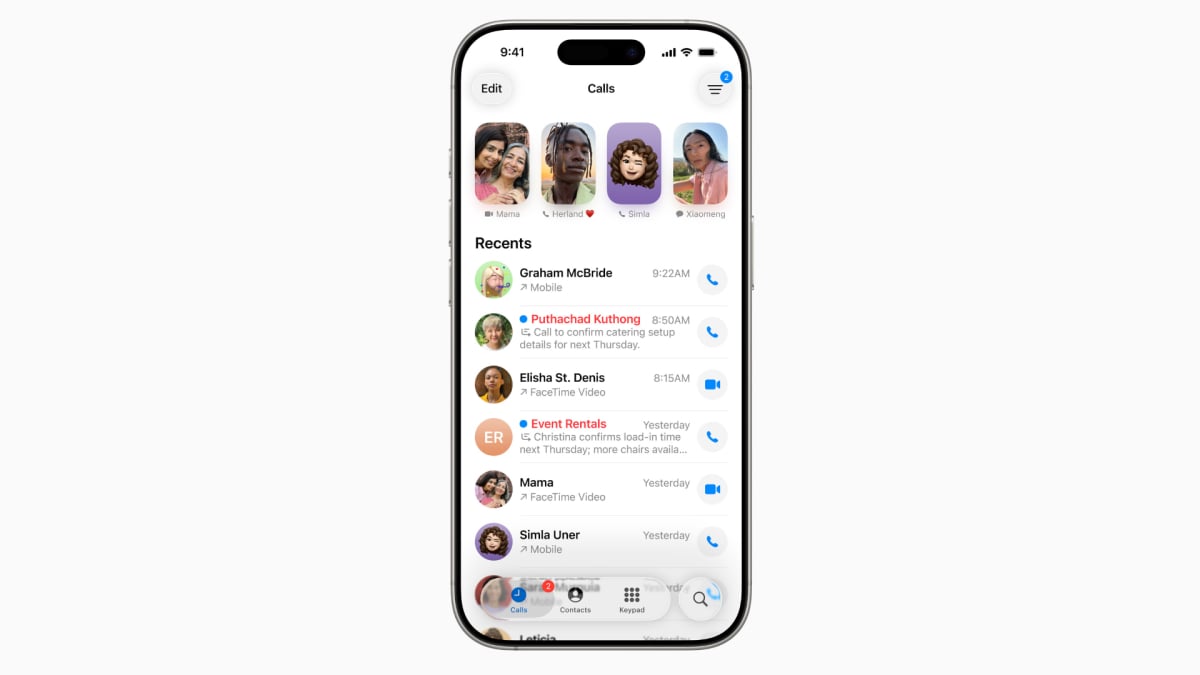
I’m talking about the new, Unified look for the Phone app. It’s not enabled by default, but the iPhone will ask you if you want to enable it, to which (of course) I said yes. The Unified look combines your Recents, Favorites, and Voicemail into one page, and it also removes the search bar from the top of the screen and replaces it with an icon in the bottom right.

Mashable Light Speed

SEE ALSO:

Apple’s new iPad Pro might solve an old camera issue with the simplest solution ever

It may seem a logical change that streamlines the Phone app and reduces clutter, but the way I use my phone, it’s just been confusing. Typically, I’ll either open the Phone app to respond to a missed call, or to call one of the relatively few people that I call on a regular basis. And I often do that in a hurry — perhaps a delivery is at my door and I missed the call, and now I’m frantically scrambling to call the guy to see if he’s driven off already. And in most situations, I don’t need Favorites or Voicemail, I just need a clear, simple list of recent callers with a search bar on top.

Fortunately, you can still go back to the Classic look.
Credit: Stan Schroeder/Mashable

Fortunately, this still exists. It’s called the Classic look, and you can bring it back it by going to the Calls tab, tapping on the three lines icon in the top right, and choosing Classic. Boom — everything is as it once was.

As a bonus, the Classic look also offers an easy, one tap filter between All and Missed calls on top of the screen, which isn’t available in the Unified look.

Apple likely knew the new look might take some getting used to, which is why the old version is still available. But I bet there will be a lot of people, like me, who will get annoyed by the new design without even realizing they can switch back. So there you have it: If you like the Unified look, by all means turn it on; but if you prefer to stay in the Classic view, it’s still available.

Source link

Share. Facebook Twitter Pinterest LinkedIn Tumblr Email
Previous Article'Legend keeps growing!' | Root claims third highest run scorer in Test cricket history!
Next Article US-Mexico deal to resolve Tijuana River sewage crisis announced by EPA
Editor
  • Website

Related Posts

Tech

iPhone exploit DarkSword has been released in the wild

March 24, 2026
Tech

The U.S. router ban: Everything you need to know

March 24, 2026
Tech

Underage sexual content, self-harm info targeted by OpenAI’s new open-source prompts

March 24, 2026
Add A Comment

Comments are closed.

Categories
  • Entertainment
  • Lifestyle
  • News
  • Sports
  • Tech
  • Travel
Recent Posts
  • Target revamps grocery in ultra-competitive Twin Cities market
  • Altar to Sol: A rare 1,900-year-old monument dedicated to the Roman god of light and used in a secret underground ritual
  • NRCC reports record $47M first quarter fundraising haul in its history
  • More Homeless Dogs Available For Adoption At Orange County’s Animal Shelter
  • Did King Arthur really exist?
calendar
April 2026
M T W T F S S
 12345
6789101112
13141516171819
20212223242526
27282930  
« Mar    
Recent Posts
  • Target revamps grocery in ultra-competitive Twin Cities market
  • Altar to Sol: A rare 1,900-year-old monument dedicated to the Roman god of light and used in a secret underground ritual
  • NRCC reports record $47M first quarter fundraising haul in its history
About

Welcome to Baynard Media, your trusted source for a diverse range of news and insights. We are committed to delivering timely, reliable, and thought-provoking content that keeps you informed
and inspired

Categories
  • Entertainment
  • Lifestyle
  • News
  • Sports
  • Tech
  • Travel
Facebook X (Twitter) Pinterest WhatsApp
  • Contact Us
  • About Us
  • Privacy Policy
  • Disclaimer
  • UNSUBSCRIBE
© 2026 copyrights reserved

Type above and press Enter to search. Press Esc to cancel.