Close Menu
  • Home
  • UNSUBSCRIBE
  • News
  • Lifestyle
  • Tech
  • Entertainment
  • Sports
  • Travel
Facebook X (Twitter) WhatsApp
Trending
  • James Webb telescope just spotted the oldest, closest pair of black holes in the early universe
  • Saving old trees may protect people’s health more than planting new ones, study of Chicago neighborhoods finds
  • Memory may not work how we thought, study of mice in artificial hibernation finds
  • Romans unceremoniously dumped plague victims down a well, mysterious mass grave in Croatia suggest
  • New AI lets robots complete tasks twice as fast
  • Mammal ancestors may have given live birth 90 million years earlier than we thought, rewriting evolutionary timelines
  • How to see and photograph the partial lunar eclipse on August 27-28
  • Watch now! The Aug. 12 total solar eclipse has begun (live stream)
Facebook X (Twitter) WhatsApp
Baynard Media
  • Home
  • UNSUBSCRIBE
  • News
  • Lifestyle
  • Tech
  • Entertainment
  • Sports
  • Travel
Baynard Media
Home»Tech»Microsoft debuts Copilot Mode in Edge. Try the agentic browser now.
Tech

Microsoft debuts Copilot Mode in Edge. Try the agentic browser now.

EditorBy EditorJuly 28, 2025No Comments3 Mins Read
Share Facebook Twitter Pinterest LinkedIn Tumblr Reddit Telegram Email
Share
Facebook Twitter LinkedIn Pinterest Email

Microsoft is jumping on the AI browser bandwagon with new Copilot features for Edge.

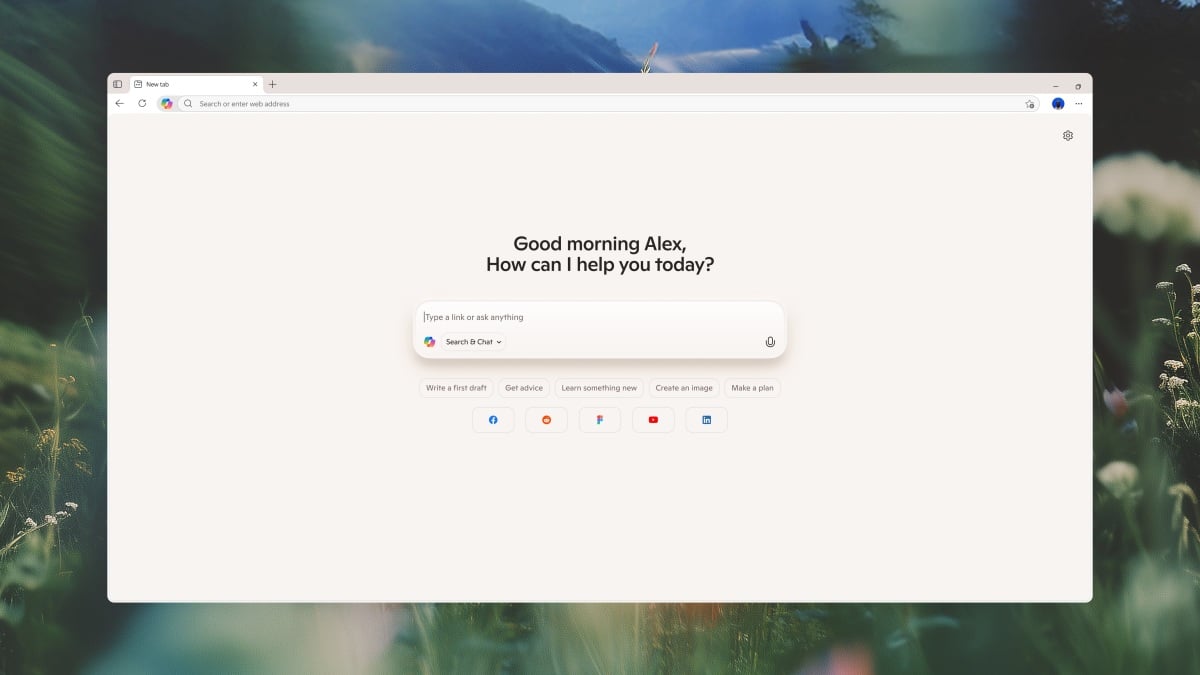
On Monday, Microsoft introduced Copilot Mode for Edge, an opt-in experimental feature with agentic AI features. (If you’ve been nodding and smiling every time you hear the words “agentic AI,” we have an explainer for you.) This includes contextual awareness across open tabs, natural voice commands for navigating the web hands-free, and Copilot in the form of a pop-up chatbot that can answer questions about the page you’re on.

Coming soon, Copilot Mode can take over your browser and perform tasks on your behalf, such as booking reservations. Copilot Mode will also soon remember your browsing history and offer suggestions based on what you’ve been searching.

Copilot Mode in Edge joins Perplexity Comet, ChatGPT Agent, and other AI assistants that can browse the web on the user’s behalf. New reasoning models can perform more complex tasks, which is fueling the advent of autonomous agents for shopping, managing your calendar, and more. This, plus the fact that Google might be forced to sell off Chrome, has suddenly created new potential for AI-powered browsers to compete with traditional browsers.

Mashable Light Speed

Think of an AI browser as a proactive, personalized assistant for handling tasks online as opposed to a static portal for manually accessing information you need. At least, that’s how tech companies and AI labs are selling it, as the so-called browser wars heat up. Meanwhile, heightened security risks, incompatibility roadblocks (with sites not optimized for agents), and deep-rooted browsing habits could threaten widespread adoption.

Plus, all this hyper-personalization comes with higher privacy risks, since AI browsers collect lots of data. As Microsoft asserted, Copilot Mode is opt-in only, and the data it collects is controlled in your personalization settings. You can turn Copilot Mode off whenever you want, and “there will always be clear, visual cues on your browser when Copilot is viewing or listening,” said the announcement. With the more involved AI features like booking reservations coming soon, Microsoft says Copilot requires your permission to access browsing history and password credentials.

How to try Copilot Mode

Copilot Mode is free… for now. Microsoft says the new features are free for a limited time, but it doesn’t specify for how long. If you want to try it out, you’ll need to install the Edge browser on Windows or Mac. From there, go to aka.ms/copilot-mode to opt into the experiment. Once opted in, you can toggle on Copilot Mode within your Edge settings.


Disclosure: Ziff Davis, Mashable’s parent company, in April filed a lawsuit against OpenAI, alleging it infringed Ziff Davis copyrights in training and operating its AI systems.

Topics
Artificial Intelligence
Microsoft

Source link

Share. Facebook Twitter Pinterest LinkedIn Tumblr Email
Previous ArticleEmma Raducanu: British No 1 continues winning feeling after first-round success in Montreal | Tennis News
Next Article Eric Church and Morgan Wallen’s Field & Stream apparel debuts on Amazon
Editor
  • Website

Related Posts

Tech

iPhone exploit DarkSword has been released in the wild

March 24, 2026
Tech

The U.S. router ban: Everything you need to know

March 24, 2026
Tech

Underage sexual content, self-harm info targeted by OpenAI’s new open-source prompts

March 24, 2026
Add A Comment

Comments are closed.

Categories
  • Entertainment
  • Lifestyle
  • News
  • Sports
  • Tech
  • Travel
Recent Posts
  • James Webb telescope just spotted the oldest, closest pair of black holes in the early universe
  • Saving old trees may protect people’s health more than planting new ones, study of Chicago neighborhoods finds
  • Memory may not work how we thought, study of mice in artificial hibernation finds
  • Romans unceremoniously dumped plague victims down a well, mysterious mass grave in Croatia suggest
  • New AI lets robots complete tasks twice as fast
calendar
August 2026
M T W T F S S
 12
3456789
10111213141516
17181920212223
24252627282930
31  
« Jul    
Recent Posts
  • James Webb telescope just spotted the oldest, closest pair of black holes in the early universe
  • Saving old trees may protect people’s health more than planting new ones, study of Chicago neighborhoods finds
  • Memory may not work how we thought, study of mice in artificial hibernation finds
About

Welcome to Baynard Media, your trusted source for a diverse range of news and insights. We are committed to delivering timely, reliable, and thought-provoking content that keeps you informed
and inspired

Categories
  • Entertainment
  • Lifestyle
  • News
  • Sports
  • Tech
  • Travel
Facebook X (Twitter) Pinterest WhatsApp
  • Contact Us
  • About Us
  • Privacy Policy
  • Disclaimer
  • UNSUBSCRIBE
© 2026 copyrights reserved

Type above and press Enter to search. Press Esc to cancel.