
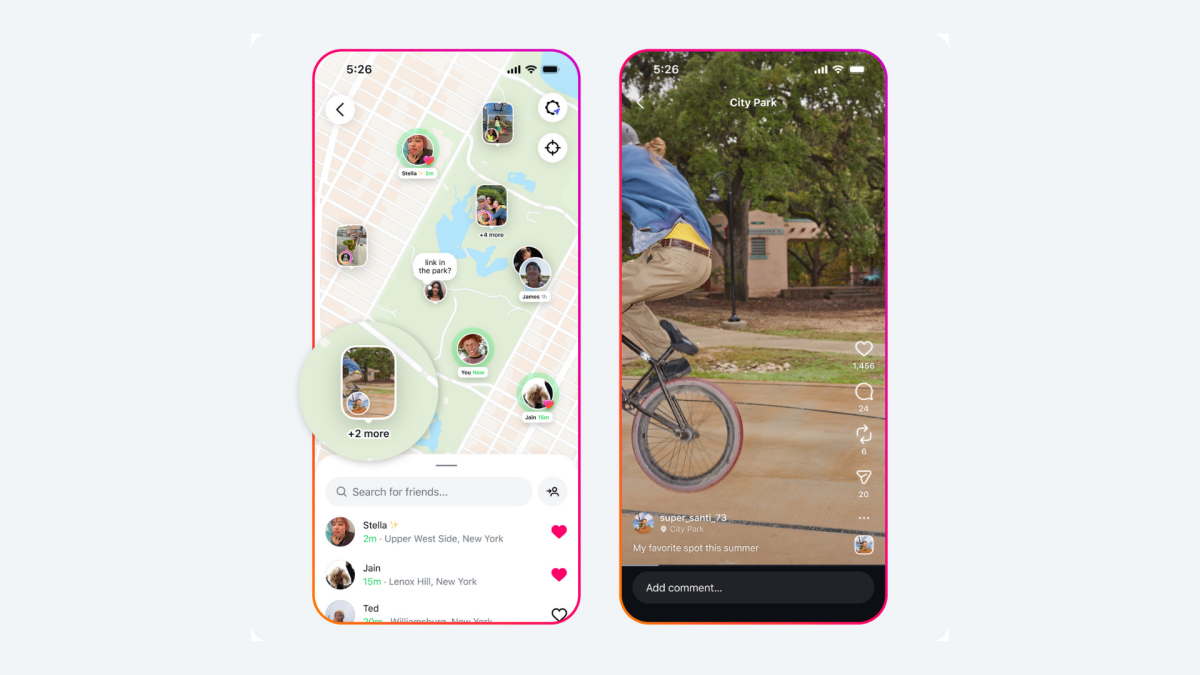
Instagram’s new Map feature lets you share your location with friends in real-time, but the addition has prompted concerns over privacy and safety.
Added on Wednesday for U.S. users, the Snap Maps-like tool allows you to see nearby friends on a Map, accessible through the Messages tab. You can also see posts tied to specific locations by friends or creators you follow, if they have opted in for location sharing (which is, importantly, off by default).
Instagram’s new Map feature lets you track friends in real-time
There’s always another side to location sharing tools beyond the fun and practicality of it all. Location sharing can give third-party advertisers a solid picture of the places you visit and how often. But location sharing can also be co-opted by creeps and even used in cases of domestic digital abuse.
Instagram has taken measures to curb this. As Mashable’s Digital Culture Editor Crystal Bell writes, “While location sharing has become a common tool for keeping track of loved ones, planning in-person events, or seeing what your ex is up to (which we don’t recommend), Instagram’s new feature offers robust controls and flexible privacy settings.”
But how does all this work? Let’s break it all down.
How does location sharing work on Instagram?
Long before the Maps feature rolled out, Instagram added location sharing in Nov. 2024, specifically for DMs.
Mashable Light Speed
According to Meta, location sharing is off by default on Instagram unless you turn it on yourself — which might come as a relief to many. The company stipulates that if you do switch location sharing on “your location is updated whenever you open the app or return to the app if it’s been running in the background.”
In an easy process we’ve detailed below, you can customise who you want to share your location with, whether friends or followers you follow back, Close Friends, selected friends, or no one. You can only share your location with accounts that you follow, and you can also single out specific people not to share your location with.
If you share your location, according to Instagram, it will update every time you open the app and will disappear after 24 hours if you haven’t opened it.
How does location sharing work with Instagram Maps?
If you’ve shared your location with someone, they can view it on Maps, through posts you’ve tagged, and within chats. You can also see where others are who have location sharing on (you can swipe up to see a list of everyone who is sharing their location with you). You can tap on a person’s icon on the Map to DM them.
You’ll find Maps in your DMs.
Credit: Instagram
Even if you have location sharing off, you can still look at the Map and see anyone who has their location shared with you.
In the Map, there are various shapes that will indicate your settings, according to Instagram:
A blue arrow: You’re sharing your location with your selected audience.
A red dot: You’re not sharing your location.
An orange triangle: You need to enable location permissions on your device to share your location.
Of course, you can turn off location sharing at any time if you’ve turned it on. Here’s how.
How to turn off location sharing on Instagram
Step 2:
Tap the arrow icon in the top right to open Messages.
Step 3:
Tap the Map feature at the top of your inbox.
Step 4:
Tap the cog icon in the top right to open Settings.
Step 5:
Choose your location sharing preferences.
Here, you can customise who you want to share your location with, whether friends or followers you follow back, Close Friends, selected friends, or no one. You can only share your location with accounts that you follow, and you can also single out specific people not to share your location with.
As for teens on Instagram, Meta says parents can decide whether their child has access to location sharing and can see who they’re sharing it with. Parents will also get a notification if their teen starts sharing their location. “If you’re a parent with supervision set up for your teen, you have control over their location sharing experience on the map,” the company wrote.
Topics
Apps & Software
Instagram
