Close Menu
  • Home
  • UNSUBSCRIBE
  • News
  • Lifestyle
  • Tech
  • Entertainment
  • Sports
  • Travel
Facebook X (Twitter) WhatsApp
Trending
  • NASA shuts off another Voyager 1 instrument as humanity’s most distant spacecraft prepares for risky ‘Big Bang’ maneuver to save power
  • Florida is facing its most intense drought in 15 years. Here’s how it got so bad and how long it will last.
  • New blood test aims to spot liver scarring when it’s still reversible and before it paves the way to cancer
  • ‘We’re the best servants anyone could dream of!’: AI superintelligence has no need to enslave humans because we’re already bowing to it
  • Glowing ring of plankton surrounding New Zealand islands linked to deadly underwater plateau — Earth from space
  • Omar files new financial form in response to Trump, GOP critics
  • New study confirms lobsters feel pain, driving scientists to call for a ban on boiling them alive
  • Ex-CENTCOM commanderwarns against ‘risky’ US ground op to seize Iran uranium
Facebook X (Twitter) WhatsApp
Baynard Media
  • Home
  • UNSUBSCRIBE
  • News
  • Lifestyle
  • Tech
  • Entertainment
  • Sports
  • Travel
Baynard Media
Home»Tech»How to share your live location on Instagram
Tech

How to share your live location on Instagram

EditorBy EditorNovember 27, 2024No Comments3 Mins Read
Share Facebook Twitter Pinterest LinkedIn Tumblr Reddit Telegram Email
Share
Facebook Twitter LinkedIn Pinterest Email

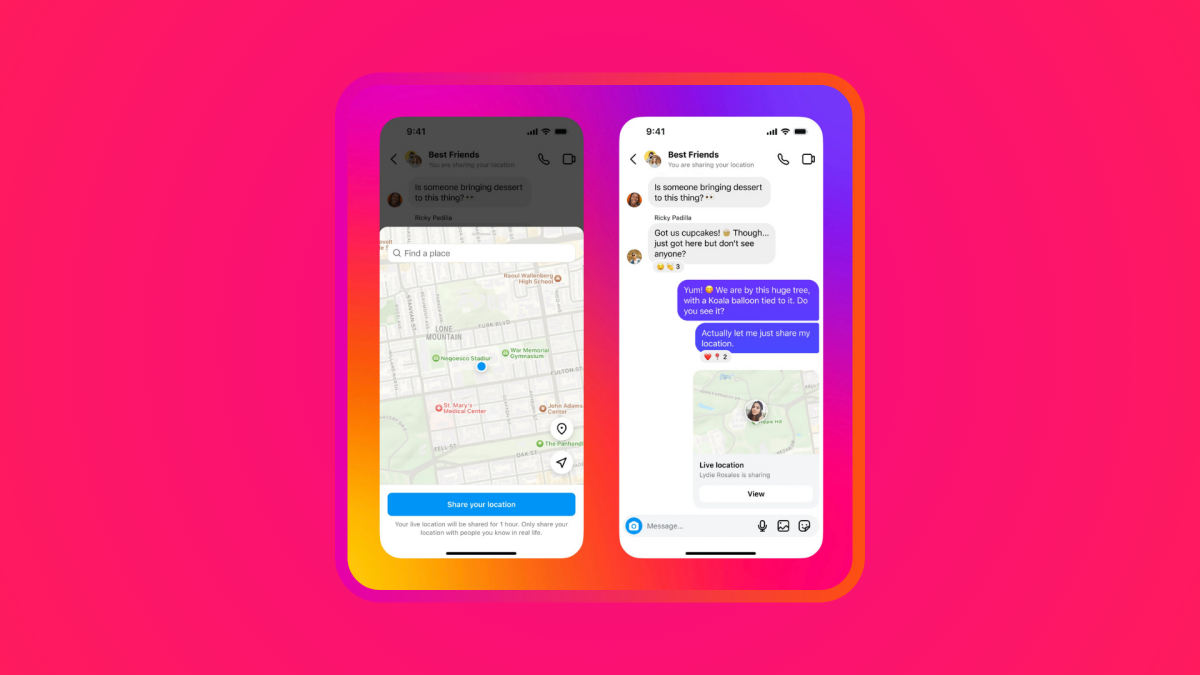
If you’re meeting up with friends or heading home, sharing your location through DMs can be a wildly useful feature — and safety method for all ages. It’s a tool that’s been long available on Google Maps, Snapchat, and pretty much all of the messaging apps out there, and finally, Instagram has added location sharing.

As of Nov. 25, Instagram now lets you send your current whereabouts to your friends for up to an hour, or share a pin so you can see how far you and your mates are from the meeting point — there will be no more “I’m almost there” shenanigans afoot.

SEE ALSO:

When do you stop sharing your location with someone?

Your live location can be shared and unshared to either a solo or group chat, and those you’ve shared to can’t forward this to other chats. And remember, you should never share your location with someone you don’t know, whatever age you are.

Importantly, if you’re under 13 you can’t set up a Instagram account at all. Instagram’s recently launched Teen Accounts (for users aged 13 to 17) are automatically set to only receive messages from accounts they follow or have previously connected with. Plus, teens under 16 will need a parent’s permission to change any of those strict automatic protections. According to Meta, “Location sharing is off for minors by default. When either an adult or minor turns on location sharing, we include a consistent indicator as a reminder that they’re sharing their location.”


Prime Day deals you can shop right now

Products available for purchase here through affiliate links are selected by our merchandising team. If you buy something through links on our site, Mashable may earn an affiliate commission.


Mashable Light Speed

The feature is available through the Instagram app on iOS and Android in select countries, and is turned off by default. But how do you turn it on? Here’s how.

How to share your live location on Instagram

What You Need

  • iPhone or Android smartphone
  • Instagram app

Step 2:
Go to your Messages.

Tap the minimalist paper airplane icon in the top right.

Step 3:
Open a chat.

Either a solo or group chat works with this feature.

Step 4:
Tap the + button at the bottom of the screen.

Step 6:
Tap “Share your location” to drop it in the chat.

Remember, you can stop sharing your location at any time, and it’s a good idea to keep in mind that you’ll still be sharing it for an hour after you activate it — even when you’ve arrived at your destination.

Why can’t I share my location on Instagram?

If you can’t see the option to share your live location in Instagram, the feature may not have launched in your country yet.

Alternatively, you may need to check if your phone is allowing location sharing. For iPhone users, you’ll need to go to Settings, tap Privacy and security, scroll down to Instagram and toggle the switch on. You’ll be prompted to select when Instagram is allowed to use your location; select either Never, Always, or While using the app, depending on your preference.


Source link

Share. Facebook Twitter Pinterest LinkedIn Tumblr Email
Previous ArticleThese My Girl Secrets Feel Like Sunshine on a Cloudy Day
Next Article Aaron Rodgers mocks people still giving ‘vax status,’ says to ‘look out’ with RFK Jr in Trump’s admin
Editor
  • Website

Related Posts

Tech

iPhone exploit DarkSword has been released in the wild

March 24, 2026
Tech

The U.S. router ban: Everything you need to know

March 24, 2026
Tech

Underage sexual content, self-harm info targeted by OpenAI’s new open-source prompts

March 24, 2026
Add A Comment

Comments are closed.

Categories
  • Entertainment
  • Lifestyle
  • News
  • Sports
  • Tech
  • Travel
Recent Posts
  • NASA shuts off another Voyager 1 instrument as humanity’s most distant spacecraft prepares for risky ‘Big Bang’ maneuver to save power
  • Florida is facing its most intense drought in 15 years. Here’s how it got so bad and how long it will last.
  • New blood test aims to spot liver scarring when it’s still reversible and before it paves the way to cancer
  • ‘We’re the best servants anyone could dream of!’: AI superintelligence has no need to enslave humans because we’re already bowing to it
  • Glowing ring of plankton surrounding New Zealand islands linked to deadly underwater plateau — Earth from space
calendar
April 2026
M T W T F S S
 12345
6789101112
13141516171819
20212223242526
27282930  
« Mar    
Recent Posts
  • NASA shuts off another Voyager 1 instrument as humanity’s most distant spacecraft prepares for risky ‘Big Bang’ maneuver to save power
  • Florida is facing its most intense drought in 15 years. Here’s how it got so bad and how long it will last.
  • New blood test aims to spot liver scarring when it’s still reversible and before it paves the way to cancer
About

Welcome to Baynard Media, your trusted source for a diverse range of news and insights. We are committed to delivering timely, reliable, and thought-provoking content that keeps you informed
and inspired

Categories
  • Entertainment
  • Lifestyle
  • News
  • Sports
  • Tech
  • Travel
Facebook X (Twitter) Pinterest WhatsApp
  • Contact Us
  • About Us
  • Privacy Policy
  • Disclaimer
  • UNSUBSCRIBE
© 2026 copyrights reserved

Type above and press Enter to search. Press Esc to cancel.