Close Menu
  • Home
  • UNSUBSCRIBE
  • News
  • Lifestyle
  • Tech
  • Entertainment
  • Sports
  • Travel
Facebook X (Twitter) WhatsApp
Trending
  • George Kittle’s wife shares live reaction to Achilles injury
  • ‘The scientific cost would be severe’: A Trump Greenland takeover would put climate research at risk
  • Headlines Across OC as Angel Stadium Sale Debate Intensifies
  • Anti-Islam activists clash with pro-Muslim counter-protesters in Dearborn, Michigan
  • Best monitor deal: Get the 45-inch LG Ultragear gaming monitor for its lowest price yet
  • Slovakia U21 0 – 4 England U21
  • 13 Top Sleep Products That Transform Your Bedtime Routine for Better Rest
  • Firefighters rescue puppies from burning house
Facebook X (Twitter) WhatsApp
Baynard Media
  • Home
  • UNSUBSCRIBE
  • News
  • Lifestyle
  • Tech
  • Entertainment
  • Sports
  • Travel
Baynard Media
Home»Tech»Apple’s new iOS 26 beta lets you tone down the Liquid Glass look
Tech

Apple’s new iOS 26 beta lets you tone down the Liquid Glass look

EditorBy EditorJuly 27, 2025No Comments3 Mins Read
Share Facebook Twitter Pinterest LinkedIn Tumblr Reddit Telegram Email
Share
Facebook Twitter LinkedIn Pinterest Email

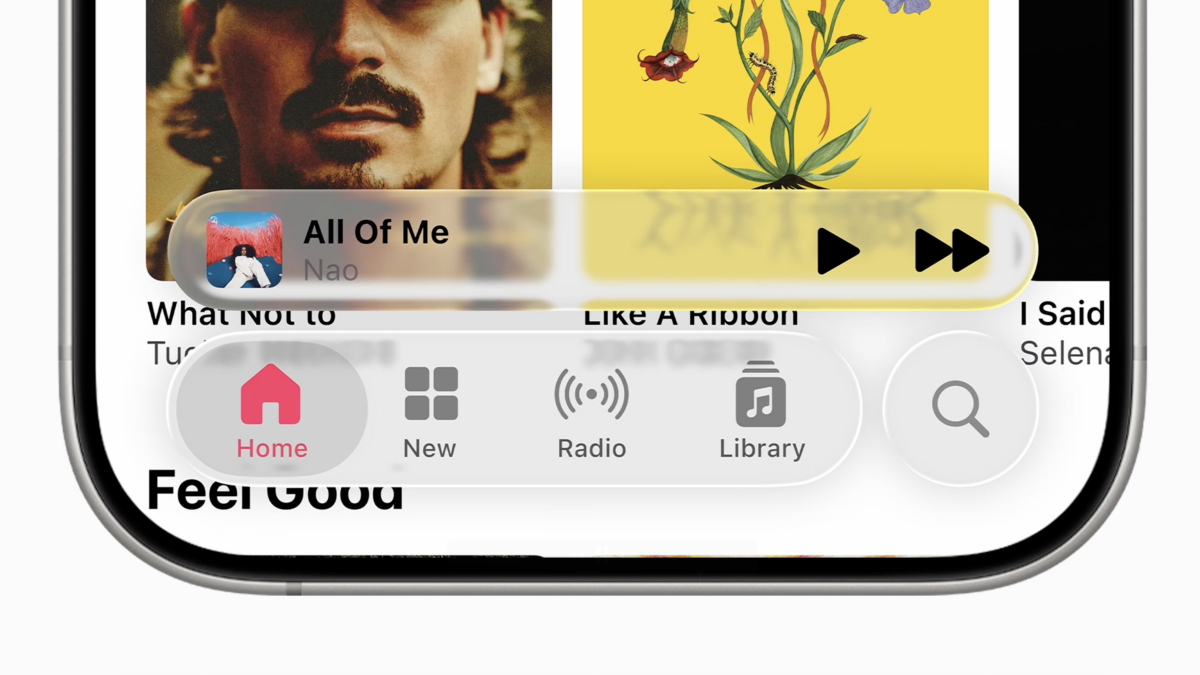
Apple’s Liquid Glass design is, by far, the most polarizing feature in iOS 26.

By making elements on the iPhone’s display semi-transparent, the operating system’s new feature creates a cool, frosty look that really hits different from what we’ve had so far. But transparency (even partial) can be detrimental to visibility, and the Liquid Glass look can often be a bit much, especially if everything is cranked to the max.

In iOS 26, Apple offers several ways to tone down the look. We’ve got instructions on how to turn Liquid Glass on for maximum effect, so you can do the opposite if you want to get rid of some of it.

SEE ALSO:

The 7 iOS 26 features only available for newer iPhones

Some of the Liquid Glass design isn’t as easy to turn off, though. Fortunately, in the new iOS 26 developer beta 2, Apple has made several changes that reduce the transparency effect more than it was possible in the previous beta. The company also toned down the effect in beta 3, only to revert some of those changes back in the final, public beta which came out on July 24.

First, the Control Center now blurs the background a lot more than before, making it easier to make out the icons in the foreground. I love the Liquid Glass look, but this was a good decision from Apple, as the idea behind the Control Center is to quickly present some of your iPhone’s key settings — and those need to be as visible as possible. The transparency effect isn’t completely gone, mind you, it’s just a lot more subdued than before.

Mashable Light Speed

It looks great, but it can be a bit much.
Credit: Apple

Apple also offers an option to reduce transparency across the entire user interface, under Accessibility – Display & Text Size – Reduce Transparency. That option was there in iOS 26 beta 1, too, but now it makes everything even less transparent than before.

Finally, if you turn on high contrast mode (go to Settings – Accessibility – Display & Text Size – Increase Contrast), some of the floating elements of the user interface (such as the Search field in the Settings) now have a border.

The changes are subtle, but when you add them up, they do make everything more legible while still keeping a hint of that frosty Liquid Glass look.

The first public beta launched on July 24, meaning it’s available to a much larger number of people. It’s still a beta release, though, so expect some bugs until the iOS 26 goes final in September.

UPDATE: Jul. 25, 2025, 3:25 p.m. The text was updated after the iOS 26 public beta was released in July.

Source link

Share. Facebook Twitter Pinterest LinkedIn Tumblr Email
Previous ArticleVitality Blast Women: Grace Harris half-century propels Surrey to title | Cricket News
Next Article Honduran illegal alien charged in fatal Wisconsin crash that killed two teens
Editor
  • Website

Related Posts

Tech

Best monitor deal: Get the 45-inch LG Ultragear gaming monitor for its lowest price yet

November 19, 2025
Tech

Zoox driverless cars now in San Francisco, competing with Waymo

November 19, 2025
Tech

Streamline your AI stack with one platform and lifetime access for $75

November 18, 2025
Add A Comment

Comments are closed.

Categories
  • Entertainment
  • Lifestyle
  • News
  • Sports
  • Tech
  • Travel
Recent Posts
  • George Kittle’s wife shares live reaction to Achilles injury
  • ‘The scientific cost would be severe’: A Trump Greenland takeover would put climate research at risk
  • Headlines Across OC as Angel Stadium Sale Debate Intensifies
  • Anti-Islam activists clash with pro-Muslim counter-protesters in Dearborn, Michigan
  • Best monitor deal: Get the 45-inch LG Ultragear gaming monitor for its lowest price yet
calendar
February 2026
M T W T F S S
 1
2345678
9101112131415
16171819202122
232425262728  
« Jan    
Recent Posts
  • George Kittle’s wife shares live reaction to Achilles injury
  • ‘The scientific cost would be severe’: A Trump Greenland takeover would put climate research at risk
  • Headlines Across OC as Angel Stadium Sale Debate Intensifies
About

Welcome to Baynard Media, your trusted source for a diverse range of news and insights. We are committed to delivering timely, reliable, and thought-provoking content that keeps you informed
and inspired

Categories
  • Entertainment
  • Lifestyle
  • News
  • Sports
  • Tech
  • Travel
Facebook X (Twitter) Pinterest WhatsApp
  • Contact Us
  • About Us
  • Privacy Policy
  • Disclaimer
  • UNSUBSCRIBE
© 2026 copyrights reserved

Type above and press Enter to search. Press Esc to cancel.