Close Menu
  • Home
  • UNSUBSCRIBE
  • News
  • Lifestyle
  • Tech
  • Entertainment
  • Sports
  • Travel
Facebook X (Twitter) WhatsApp
Trending
  • George Kittle’s wife shares live reaction to Achilles injury
  • ‘The scientific cost would be severe’: A Trump Greenland takeover would put climate research at risk
  • Headlines Across OC as Angel Stadium Sale Debate Intensifies
  • Anti-Islam activists clash with pro-Muslim counter-protesters in Dearborn, Michigan
  • Best monitor deal: Get the 45-inch LG Ultragear gaming monitor for its lowest price yet
  • Slovakia U21 0 – 4 England U21
  • 13 Top Sleep Products That Transform Your Bedtime Routine for Better Rest
  • Firefighters rescue puppies from burning house
Facebook X (Twitter) WhatsApp
Baynard Media
  • Home
  • UNSUBSCRIBE
  • News
  • Lifestyle
  • Tech
  • Entertainment
  • Sports
  • Travel
Baynard Media
Home»Tech»Apple Maps on the web just got a lot better
Tech

Apple Maps on the web just got a lot better

EditorBy EditorDecember 18, 2024No Comments2 Mins Read
Share Facebook Twitter Pinterest LinkedIn Tumblr Reddit Telegram Email
Share
Facebook Twitter LinkedIn Pinterest Email

It took Apple a long, long time to properly bring Apple Maps to the web, but the version that we got in July was…well, adequate. You could use it to search for places, explore the map or get directions, but advanced features such as Look Around, Apple’s version of Google Maps’ Street View, were missing.

Well, Apple recently rectified this omission.

SEE ALSO:

Apple is finally getting serious about foldable devices, reports say

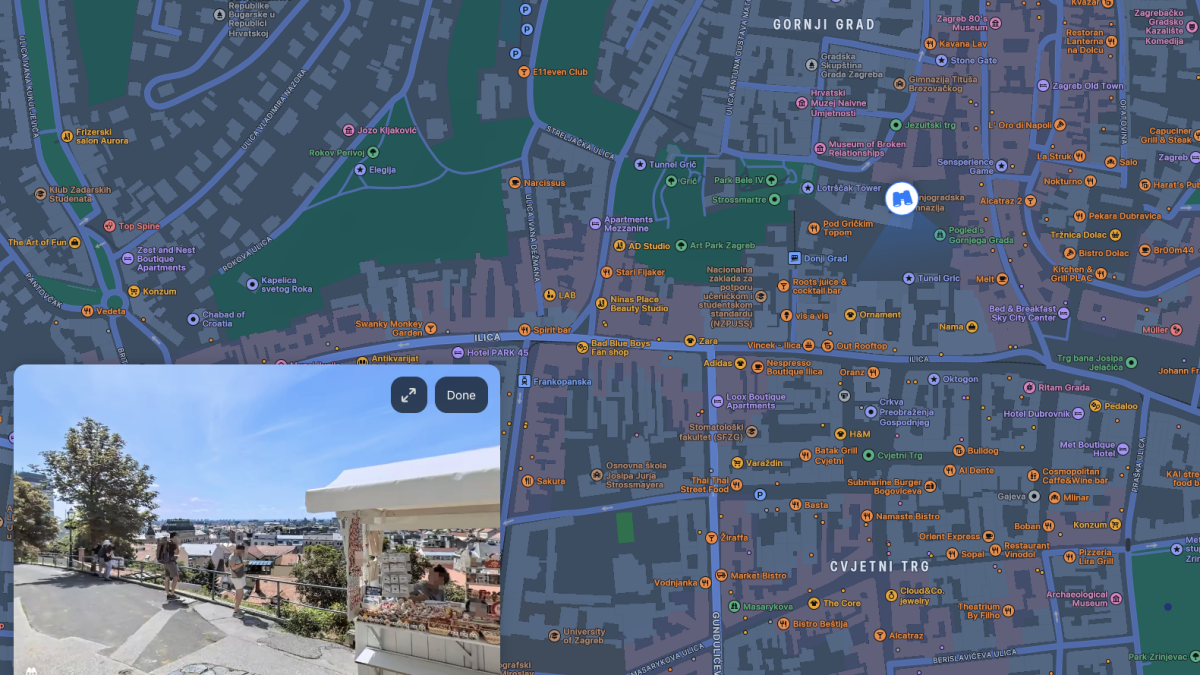
As noticed by Chris Carley (via 9to5Mac) Apple Maps beta now has Look Around, which shows up as a small binoculars icon in the bottom left corner of the map. Click it, and you get a small window showing you the surroundings in a 360-degree, panoramic view. You can extend that window to cover the entire area of the map. Inside the Look Around view, you can click and drag with your mouse to turn around, zoom in and out with a pinch gesture on your trackpad, or double tap anywhere to move the camera forward.

Mashable Light Speed

Apple Maps Look Around

This is an expanded view of a street in New York City.
Credit: Apple Maps

It’s a little different than Google Maps’ Street View, which enables you to drag the little yellow man anywhere on the map to get a view of that precise location. On Apple Maps, you have to activate Look Around, and then click on a precise location on the map to see the surroundings there. Also, Apple Maps lets you move around in smaller increments, which can be useful if you need to check something in a very precise location, such as a street number.

Unlike Street View, Apple’s Look Around is not available just about anywhere; you’ll find it in some cities in the U.S., most of Europe, the UK, Japan, and Israel, to name a few places. For a full list, check Apple’s website.

The feature works in Chrome, Edge, Firefox, and Safari; you can check it out on Apple Maps.


Source link

Share. Facebook Twitter Pinterest LinkedIn Tumblr Email
Previous ArticleDavid Allen: Johnny Fisher is nervous about fighting me – and I’m terrified of being knocked out | Boxing News
Next Article Stuck on gift ideas? These excellent noise-canceling headphones are still 43% off and matching its Black Friday price
Editor
  • Website

Related Posts

Tech

Best monitor deal: Get the 45-inch LG Ultragear gaming monitor for its lowest price yet

November 19, 2025
Tech

Zoox driverless cars now in San Francisco, competing with Waymo

November 19, 2025
Tech

Streamline your AI stack with one platform and lifetime access for $75

November 18, 2025
Add A Comment

Comments are closed.

Categories
  • Entertainment
  • Lifestyle
  • News
  • Sports
  • Tech
  • Travel
Recent Posts
  • George Kittle’s wife shares live reaction to Achilles injury
  • ‘The scientific cost would be severe’: A Trump Greenland takeover would put climate research at risk
  • Headlines Across OC as Angel Stadium Sale Debate Intensifies
  • Anti-Islam activists clash with pro-Muslim counter-protesters in Dearborn, Michigan
  • Best monitor deal: Get the 45-inch LG Ultragear gaming monitor for its lowest price yet
calendar
February 2026
M T W T F S S
 1
2345678
9101112131415
16171819202122
232425262728  
« Jan    
Recent Posts
  • George Kittle’s wife shares live reaction to Achilles injury
  • ‘The scientific cost would be severe’: A Trump Greenland takeover would put climate research at risk
  • Headlines Across OC as Angel Stadium Sale Debate Intensifies
About

Welcome to Baynard Media, your trusted source for a diverse range of news and insights. We are committed to delivering timely, reliable, and thought-provoking content that keeps you informed
and inspired

Categories
  • Entertainment
  • Lifestyle
  • News
  • Sports
  • Tech
  • Travel
Facebook X (Twitter) Pinterest WhatsApp
  • Contact Us
  • About Us
  • Privacy Policy
  • Disclaimer
  • UNSUBSCRIBE
© 2026 copyrights reserved

Type above and press Enter to search. Press Esc to cancel.